Short answer: Dual Fibo Auto Pro finds swings with an enhanced ZigZag and draws two Fibonacci grids on them by itself. The first sits on the latest completed swing, the second on the larger historical swing that matters most for the current market. The indicator is free, works on any symbol and timeframe, and comes in versions for MT4 and MT5. It does not give entry signals - it shows the market structure.
Why two grids
A single grid answers one question: where is the current move relative to the last swing. It says nothing about where that swing sits in the bigger picture. A second grid, built on a larger historical swing, adds the second scale. Where levels of the two grids overlap or lie close to each other, you get zones worth a closer look, and you no longer have to redraw anything by hand when the market moves on.
What you see on the chart
- Enhanced ZigZag. The classic algorithm with the usual Depth, Deviation and Backstep, plus extended handling of the outside bar. If a single bar sets both a new high and a new low, the colour of the candle decides which comes first, so a peak and a trough can form on the same bar.
- Swing percentage labels. Above each peak and below each trough the indicator shows the size of the swing as a percentage of the previous one. 61.8% means the swing retraced the previous wave, 161.8% means it is 1.618 times larger. Only completed swings get a label.
- First grid (silver by default) on the most recently completed swing.
- Second grid (blue by default) on a larger swing in the past, with its own set of levels (23.6 and 76.4 are included by default).
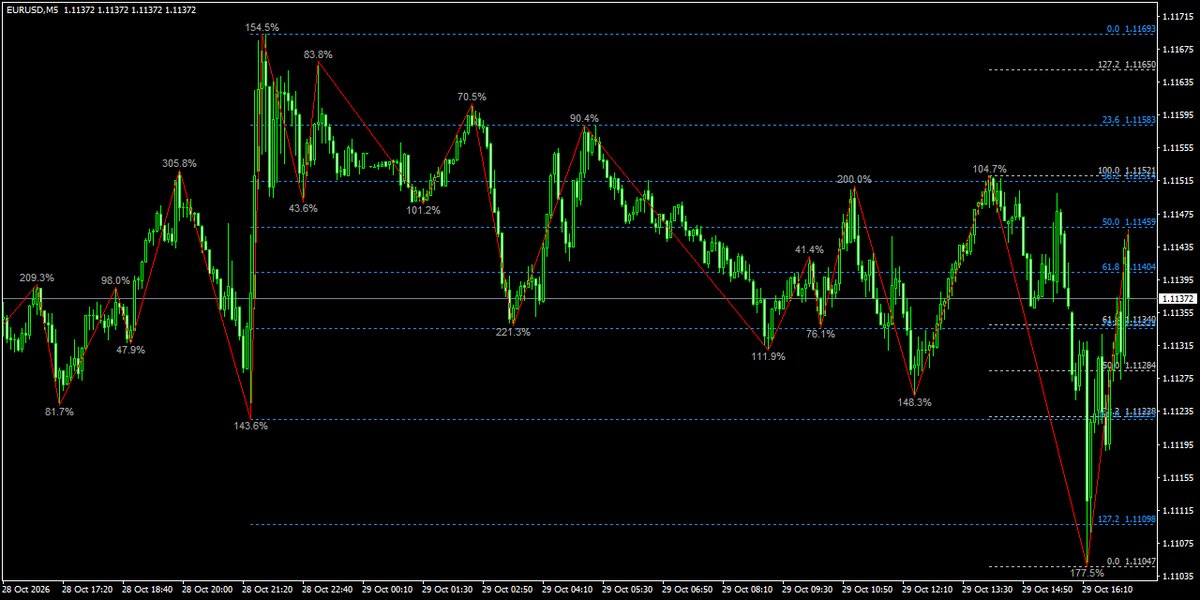
How the first grid moves
The grid jumps to a new swing when the current ZigZag leg pulls back by at least the set percentage (38.2% by default). If the pullback is shallow and price breaks the extreme right away, the grid stays on the previous swing and flips: 0% moves to its origin and the extension levels (127.2, 161.8, 261.8) point in the direction of the move that is still going.
How the second grid chooses its swing
The second grid is the part that does the "intelligent" work:
- At the start the indicator measures the swing of the first grid and looks for the nearest larger swing in the history. The second grid always sits deeper in the past and never overlaps the first.
- Its 0% level is anchored to the origin of that swing. If price breaks beyond it, the grid flips toward the current direction at once.
- While price stays within the breakout level (161.8 by default), the grid keeps its place, even if the first grid has already moved to newer swings.
- When 161.8 is broken, or price has tested both ends of the swing, the indicator looks for a new significant swing on the next ZigZag swing.
- If there is no suitable swing, the grid stays where it is and flips toward the stronger breakout. The search repeats on every new swing.
The indicator is light on resources: on every tick it recalculates the ZigZag only over the recent extremes, and the second grid changes only on confirmed points, when a swing is finished.
How to use it
- Find zones where levels of both grids overlap or lie close together.
- See corrective and consolidation phases inside the range of the larger grid.
- Set targets with the 127.2, 161.8 and 261.8 extensions for the current impulse and for the larger wave.
- Judge the depth of a retracement by the percentage labels.
- Look at the structure on several timeframes and instruments: forex, crypto, indices, stocks.
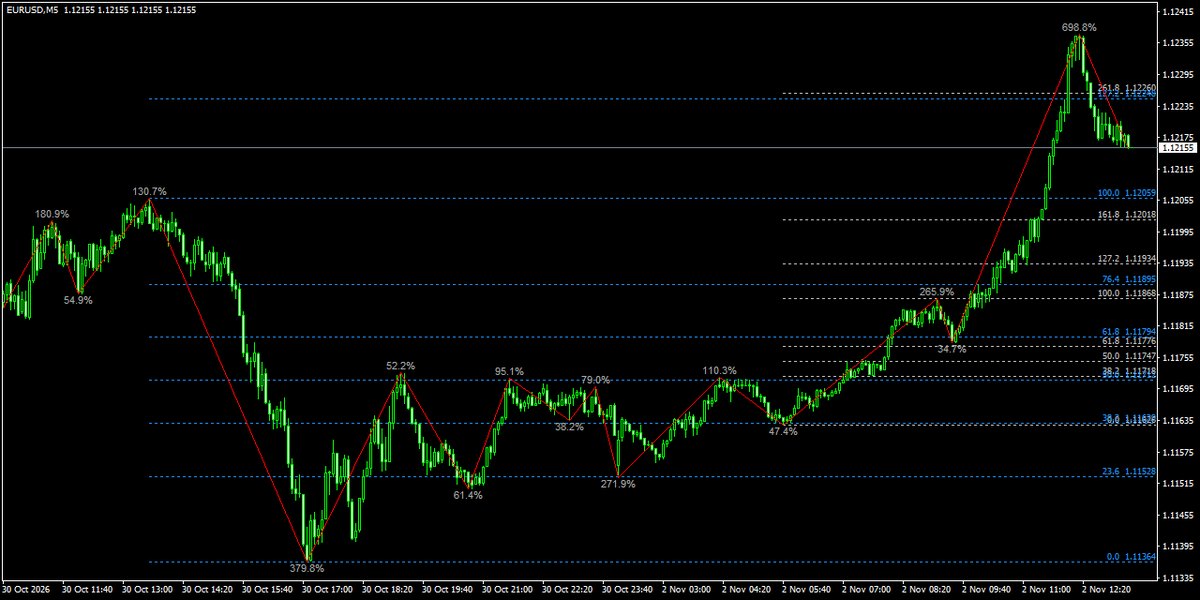
One thing to remember: the last ZigZag leg is still forming and can be revised like in any ZigZag, so the first grid can follow it. Completed swings in the history stay put.
For EA developers: the buffers
The extremes are available straight from the indicator buffers: buffer 0 holds the peaks and buffer 1 the troughs. In MT4 you read them with iCustom:
double peak   = iCustom(NULL, 0, "Market\\DualFiboAutoPro", 12, 5, 3, 0, i); // peak
double trough = iCustom(NULL, 0, "Market\\DualFiboAutoPro", 12, 5, 3, 1, i); // trough
The numbers 12, 5, 3 are Depth, Deviation and Backstep. In MT5 the same buffers are read with CopyBuffer on the indicator handle.
Main settings
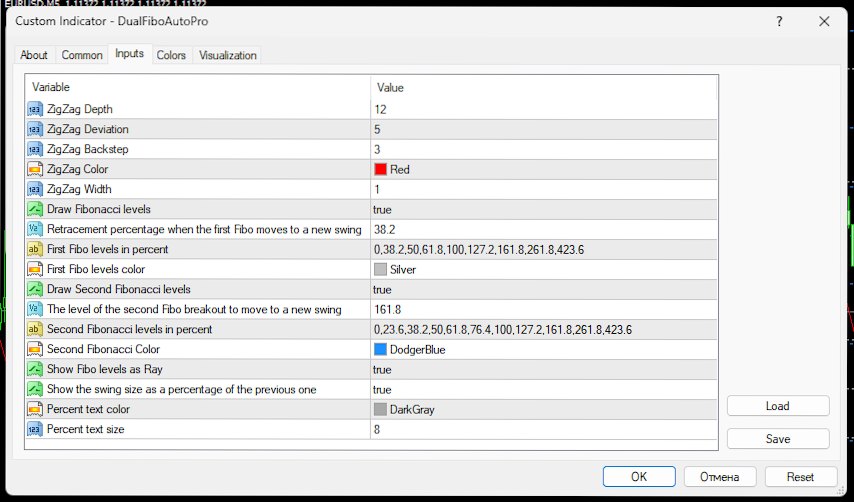
- ZigZag Depth, Deviation, Backstep - 12, 5, 3 by default.
- Retracement percentage when the first Fibo moves to a new swing - 38.2 by default.
- The level of the second Fibo breakout to move to a new swing - 161.8 by default.
- Level lists and colours for both grids, written as comma-separated percentages.
- Show Fibo levels as Ray - extends the levels to the right without limit.
- Show the swing size as a percentage of the previous one - turns the labels on and off.
Where to get it
Dual Fibo Auto Pro is free on MQL5 Market: MT4 and MT5. Attach it to a chart and it starts drawing. Questions and suggestions are welcome in the comments under the product, and the other tools are collected on the Products page.