Short answer: unlike MT5, MetaTrader 4 has no economic calendar of its own. Two products close the gap. The Economic Calendar indicator draws the news on your charts and carries the whole event base since 2007 inside the file, so it also works in the Strategy Tester. The Calendar Feed Expert Advisor brings live data, sends alerts to your phone and, if you enable it, closes orders and pauses other EAs shortly before a release. Each works on its own, and together they give more.
Why a calendar matters
Technical analysis alone does not make trading safe. Important news comes out while you are asleep, at lunch or looking at another chart, and within seconds a calm position becomes a problem: the spread widens, price jumps over your stops and slippage eats part of the deposit. Knowing that a release is coming is not enough, you also have to manage to do something about it.
There is the same issue in testing. A strategy tested mostly on quiet days looks better than it will in life. To judge it honestly you need to see how it went through every big release.
The indicator: the calendar on the chart and in the tester
The main advantage over other calendars: the event base since 2007 is built into the file. The indicator needs no internet, no WebRequest and no subscription, and it runs in the Strategy Tester, so you can check how your EA lived through every important release in almost twenty years. Currencies are taken from the symbol (EURUSD gives EUR and USD), or you can set your own list.
What you see:
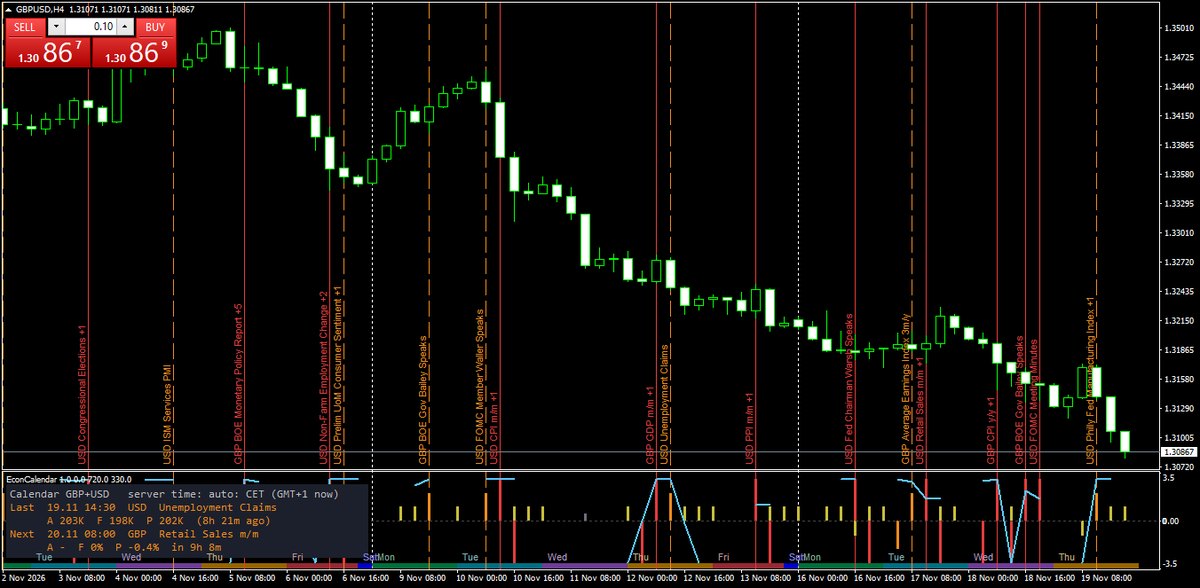
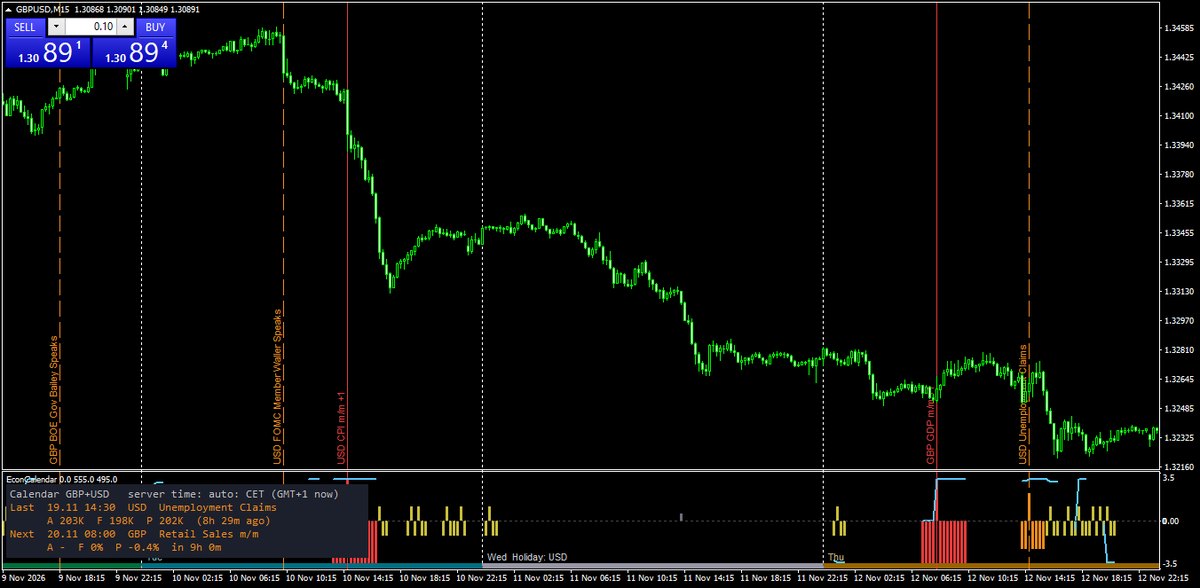
- News histograms by impact: holiday, low, medium and high. The event itself goes up, the "before and after" window goes down, and the length of the windows is set separately for each level.
- Vertical event lines with titles, in the indicator window and on the main chart. The most important ones are shown first, and their number is limited, so the chart does not turn into a fence.
- An info panel (the Info button): the last and the nearest event, previous / forecast / actual values and a warning when the calendar data is about to end.
- Event history: click a line and the panel shows a chart of the values from earlier releases of this news, actual and forecast.
- A weekday strip that colours weekends, holidays and working days differently.
- The broker's time zone is detected automatically or set by hand.
The base is updated every month through Market, as with any product, and the indicator warns you when the data is close to the end.
The indicator for your EAs: the buffers
The indicator hands data to Expert Advisors through buffers. Thanks to the built-in base this works in the tester too.
| # | Buffer | What it holds |
|---|---|---|
| 0 | Holiday | holidays |
| 1 | Low | low-impact events |
| 2 | Medium | medium-impact events |
| 3 | High | high-impact events |
| 4 | Trade stop | 0 free, 1 inside a news window, 2 day closed |
| 5 | Min to next | minutes to the next event |
| 6 | Min since last | minutes since the last event |
The most useful one is buffer 4, "Trade stop". By default a window for high-impact news is 1 hour before and 2 hours after, for medium 30 minutes before and 1 hour after. A day can be closed completely, for example on a rate decision or Non-Farm Payrolls, and the list of such events is configurable. A few lines are enough for an EA:
// no new trades near the news or on a closed day
double stop = iCustom(Symbol(), Period(), "EconCalendar", 4, 0);
if(stop != EMPTY_VALUE && stop >= 1.0) return;

// the news is 15 minutes away or closer: remove the orders
double toNext = iCustom(Symbol(), Period(), "EconCalendar", 5, 0);
if(toNext != EMPTY_VALUE && toNext <= 15) CloseAllMyOrders();
Check EMPTY_VALUE explicitly: in MQL4 it equals 2147483647, not zero. The full list of parameters and the details of each buffer are in the full guide on MQL5.
The Expert Advisor: panel, alerts and Guard
The Calendar Feed Expert Advisor does not trade the news. It is a panel, an alert system and a guard: it watches the schedule while you are busy and either tells you in time or takes your orders out of the market. It works on its own, the indicator is not required.
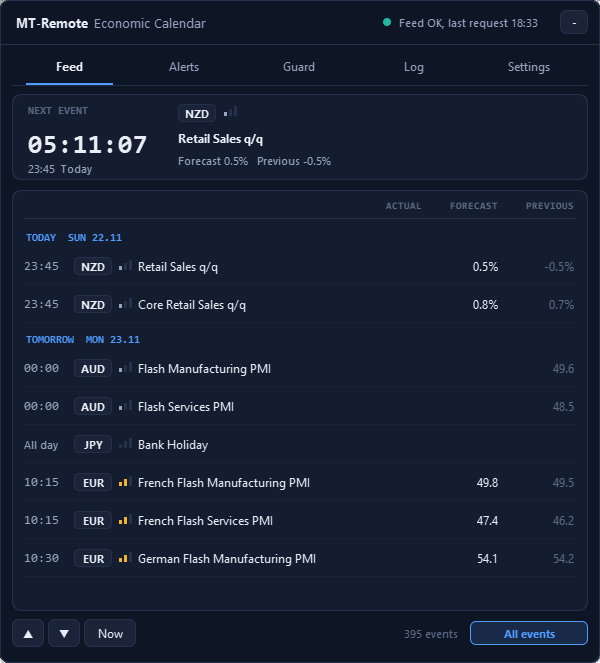
The panel takes the whole height of the chart and can be dragged and collapsed. It has the tabs Feed, Alerts, Guard, Log and Settings.
Feed. The nearest events with filters by currency and impact, in your time zone, the broker's or UTC. The actual value appears seconds after the release.
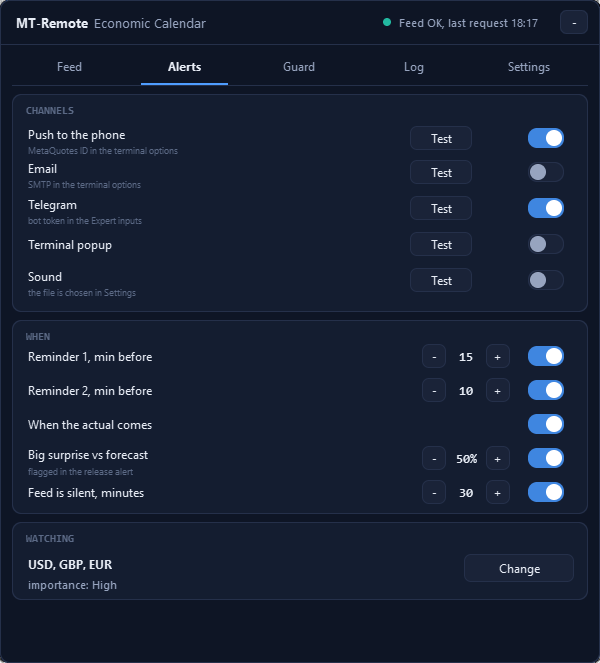
Alerts. Channels: a push to your phone (MetaQuotes ID), e-mail, a Telegram bot, a terminal window and sound. You get two reminders N minutes before the news, a message with the actual figure, a "Surprise" tag when the actual value differs strongly from the forecast, and a warning if the data feed has gone silent. Every reminder is sent once and is not repeated after a terminal restart.
Guard. Here you choose a block of important news from the list and turn on, for it:
- closing orders N minutes before the news: positions (all, only in profit, only in loss) and pending orders, independently of each other;
- stopping Expert Advisors M minutes before (the Algo Trading button is switched off) and switching them back on K minutes after the release;
- filters by symbols, magic numbers and tickets;
- forced Algo Trading: if the button is off and the orders have to be closed, the EA switches it on, closes them and switches it off again.
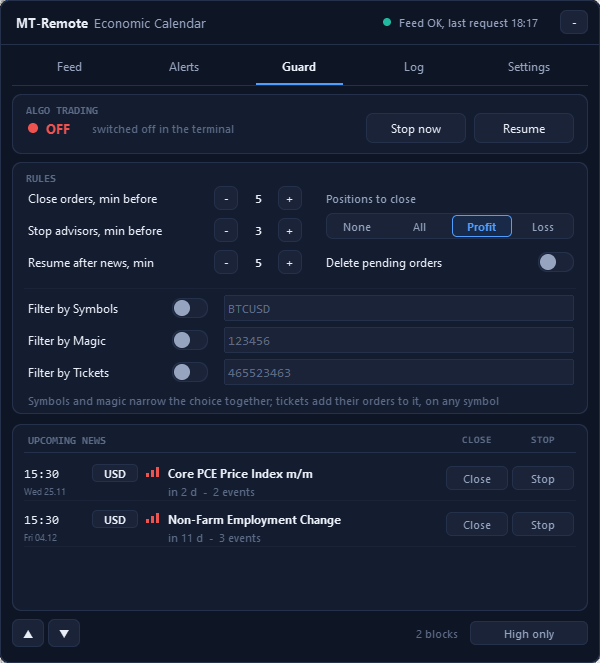
Every closed or deleted order comes as a separate notification, so does every switch of Algo Trading and every closing error. If the market is closed or the server is busy, the EA keeps trying until the news. By default Guard does nothing: every block is turned on by you by hand.
Live data
The calendar updates over the network every few minutes (the interval is a setting). You have to allow the address from the FeedUrl parameter once in Tools - Options - Expert Advisors - "Allow WebRequest for listed URL" (and api.telegram.org for Telegram). If the connection is lost, the EA tells you, and the data stays as it was.
Better together
With the Expert Advisor running, the indicator gets live actual, forecast and previous values right after the release, and revised or moved events are updated. One Expert Advisor on any single chart is enough for all the indicators of the terminal, nothing has to be configured for the link. The indicator saves what it receives to a file, so nothing is lost after a restart.
What to keep in mind
- The Expert Advisor works in MetaTrader 4 and needs WebRequest enabled for the feed address.
- For switching the Algo Trading button there is an optional helper Expert Advisor, AlgoSwitchHelper: it is free, open source and downloaded separately from the author's GitHub (see the full guide). You put it once into
MQL4\Expertsand allow it to import DLLs. Without it closing orders still works, only the button will not be switched. The Calendar Feed itself uses no DLLs. - The Expert Advisor cannot override the "Allow automated trading" ban in the settings of the EA itself.
- In the Strategy Tester it works on demo events and sends nothing.
- A calendar is reference information, not a trading signal. Closing orders before the news is a risk-management tool, not a guarantee: slippage, wider spreads and connection drops are possible. Check the Guard settings (minutes, filters, order types) on a demo account before trusting it with real money.
Where to get them
Both products are on MQL5 Market, 49.99 USD each, and both have a free demo: the Economic Calendar indicator and the Calendar Feed Expert Advisor. The other products are on the Products page.